Bill by barcode. Print labels. Scan supplier bills. Take Tally on the road.
TBB & Saathi sits beside TallyPrime on your PC. Scan a barcode and the voucher builds itself; photograph a supplier bill and it posts with GST. The Saathi Business app puts orders, collections and your shop's figures on your team's phones.
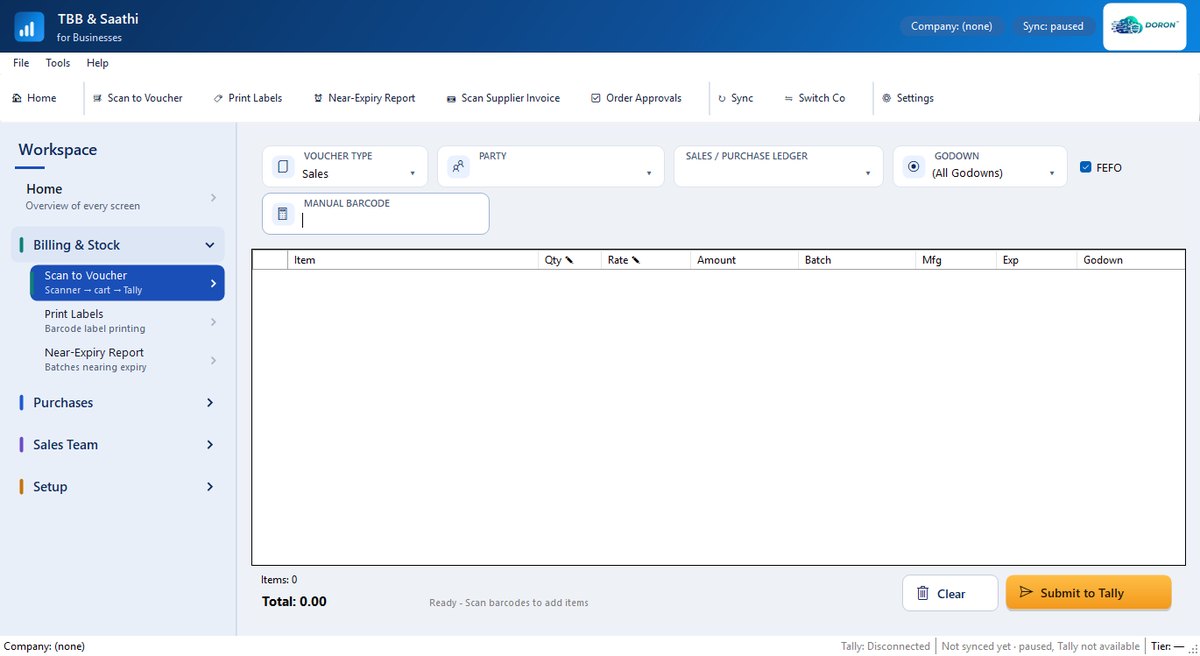
Scan to Voucher: pick the voucher type and party, scan, and submit to Tally.
One product for the counter, the store room and the road
Works with your existing TallyPrime company — nothing to migrate.
🧾 Billing & stock
Scan to Voucher for sales, purchases, delivery and receipt notes and stock journals. FEFO batch picking for pharma, a near-expiry report, barcode labels.
Read more →📷 Purchases
Scan Supplier Invoice reads a bill photo or PDF, matches parties and items, and posts the purchase with CGST, SGST or IGST and the supplier's bill number.
Read more →📱 Sales team
Reps book orders and collect payments (UPI too) on the Saathi Business app, with photos. You approve orders before they reach Tally.
Read more →📊 Owners
Sales, receivables, low stock and expiring batches on your phone, even away from the shop — kept fresh from the PC.
Read more →Getting started takes four steps
Licences come from DORON or your DORON channel partner.
Get a licence
Talk to us or your channel partner. You receive a voucher code for your plan.
Install on the Tally PC
Download TBB & Saathi for Windows and install it on the PC that runs TallyPrime.
Activate
Enter the voucher code at first start. TBB & Saathi reads your items, ledgers and batches from Tally.
Pair phones
Install Saathi Business on Android phones and scan the pairing QR on the PC's Mobile Bridge screen.